0

Category: Budgets

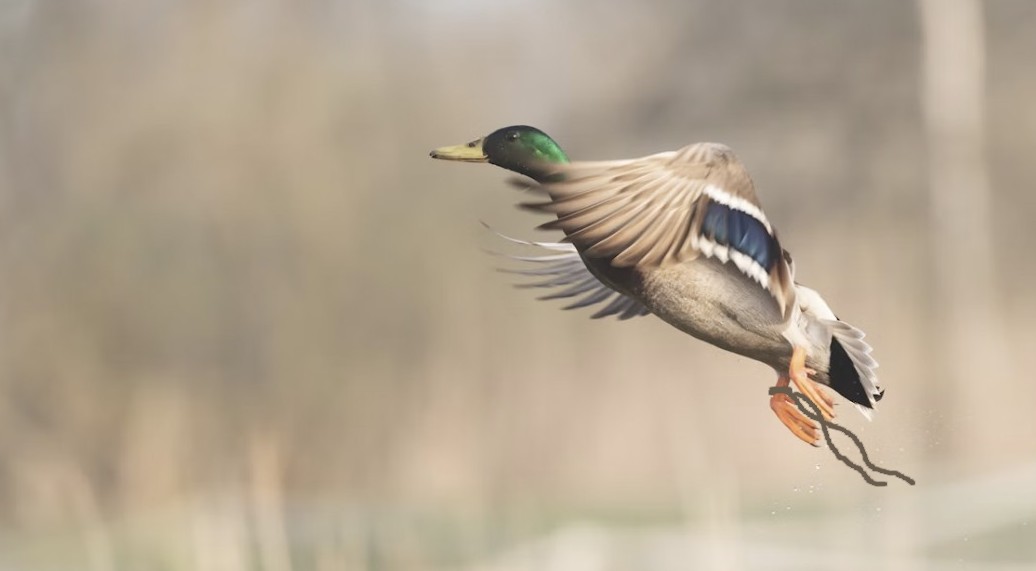
Duck with tether, flying

CGI That Anachronism!

Hidden CGI is visual effects that are hidden in plain sight but are effectively invisible, not flashy. When you think of Hidden CGI, you probably first think about Forrest Gump, especially: the removal of Sargent Dan’s legs and the integrating of (fictional) Forrest into existing (real life) news footage to make the news clip suit the story of the film. This is Hidden CGI on a big and expensive scale.

On a small, shot-by-shot scale (which can also be costly), you may need CGI to remove unwanteds from the shot – stereotypically, to remove a boom that sneaks into frame, but it could also be:

  • The dog’s waggy tail while it’s growling (the dog may wag its tail in happiness of a job well done, but the tail is anachronistic – and distracting – to the mean growl)
  • Telephone poles or cell phone towers in country vista of a pre-electricity period piece
  • The tether on a flying, trained bird – the trainer may need it, but can’t remove it for the shot

If you don’t CGI the correction, the anachronism will distract and pull the audience out of the magic of the story, so have a read through your script.

Can you find Hidden CGI shots or potential ones in your script? Know early so you can plan during the shoot to minimize your need for CGI in post.

Cheers & a good shoot to you,
Deb

=====================

Film Production Management 101” (now in its third edition) is updated for today’s respectful workplace and sustainable practices – available worldwide, including Amazon-USA, Indigo-Canada and many other bookstores or directly from the publisher (MWP).

Write! Shoot! Edit!” (written for young adults) is a choose-your-own-path book where you can follow the path of the writer, director-DP or editor to make your first films. It’s also available worldwide, including Amazon-USA, Indigo-Canada (Kobo), or directly from the publisher (MWP).

What a Screenwriter Needs to Know About… Production Budgets

Writing and money… am I serious?

In the collaborative spirit of the film industry… yes.

I’ve taken a moment (ok, 4 min and 45 sec) to highlight a few things that writers should know about production budgets, because… well… when you write a movie, the script is not not going to be the story’s final form.

Here ’tis :

https://youtu.be/0eAoChVXSAc

Cheers & insightful writing to you,
Deb

– – – – – – – – – – – – – –

For more info on production budgets and on many more details about the production process, come over and check out my book “Film Production Management 101.”

You can also see me in person at the UFVA Conference in Las Vegas, July 31 – Aug. 4. I’ll be on several panels or at the MWP Books booth.

I’ll also be at the Future of Story Conference on August 1.

Backwards Budgeting

When it comes to budgeting, whatever you do, don’t start at the beginning! Start backwards.

Huh?

Peruse a budget template. That’s a lot of categories, isn’t it? Kind of makes the budget template seem smart by itself. Not so.

Sure, if you start budgeting at the first category and work your way linearly though the template to the end, you’re going to find line items you never considered. You’ll say to yourself, “that sounds good. I probably need one of those” and add it to your budget… and sooner than later your budget’s bottom line will swell to an unruly size. Who’d have thought that your production would cost so much!

The solution? Start budgeting backwards.

How much money might you have for the production? A ballpark figure will do, if the final financing amount isn’t available. That’s the end and that’s as far as you want to go.

Now go to the middle. Start budgeting the set crew categories below-the-line. You’ve decided on how many days, so that’s the place to plug in the first set of numbers. Bypass many of the template’s recommended categories. If you’re not entirely sure that you might want one of its recommendations, add it in for $1… the ridiculous amount will flag the category for when you review the overall budget after writing the first draft and then you can consider the recommendation in context of the entire budget and all departments in place.

Finally, fill in the other missing categories. By the time you review the budget from beginning to end (toward the end of your first draft), you will have a sense of the overall budget and can more wisely by-pass or select those extra categories.

It takes a bit of practice to know how big a crew and how many days a budget can support at different budget levels, but you’ll probably surprise yourself when you slow down a bit and let your logical brain kick in. The budget template is only a guide… and you’re the smart one writing the budget itself.

Cheers & smart budgeting to you,
Deb

Why Craft Service & Catering Should be Good

It’s a big budget production…  the production can afford it! Craft & catering should be good. It’s expected; it’s respectful.

It’s a low budget production… the production may not be providing enough time or money to the cast & crew to buy groceries. Craft & catering should be good. Production needs a healthy cast & crew; it’s respectful.

Good food, respect & a good shoot to you!
Deb

Ciné-surfer: $1M Budget Breakdown (from Oz Film Commission)

The Australia Film Commission has a set of feature articles worth perusing. One in particular is called “The Financial Lowdown“.

Though this article is a tad old (it references films shot between 2000 and 2003), the content is still excellent. There’s a breakdown of a $1M production budget that helps with understanding of generally where in the budget the money goes. There is also discussion of how many shoot days are typical for low budget features and much more.

So… read it, learn from it, bookmark it! Then you can peruse their other articles too. Are any of them of significant interest to you?

Cheers & happy budgeting to you,
Deb

Harry Potter – Part 1: 7 Magical Moments

It is said that with 7 memorable scenes in a movie – I mean really memorable, magical scenes – then the movie has great potential to do well.

In honour of the last Harry Potter movie coming out, I thought to examine this idea using the first Harry Potter movie. If any movie were filled with memorable, magical scenes, then I believe this one would be it. The trick in this case is to identify the scenes of the movie, not the scenes of the book…. because reading the book is a very different experience from watching the movie.

So, here, for “Harry Potter and the Philosopher’s Stone”…

  1. The Harry Potter theme music over mist in the darkness and the first magic of Dumbledore & McGonagall
  2. Olivander facilitates the “twin” wand choosing Harry
  3. Through the wall and arriving on platform 9 3/4 to see the Hogwarts Express
  4. Harry, Ron and Hermione meet on the train over candy, spells and a dirty nose
  5. Snape explains the subtlety, fame & glory of potions… and labels Harry a celebrity
  6. In the great hall at the end, Neville earns the winning 10 points
  7. Hagrid gives Harry the photo album of wizard photos of Harry & his parents

Aha! Are these memorable moments different from yours? Hard to keep it to only seven?

Identifying the most memorable & magical scenes in your script will help to identify where and when to spend the production’s budget to maximize “getting the magic on the screen”. I’m not talking about “getting the story on the screen” – which is also a requirement of the focus of the budget – but finding the moments where the viewer’s thoughts are going to linger after leaving the theatre.

This list also shows us that allocating the production budget wisely may mean to allocate funds to special effects (the obvious) but also to time spent in rehearsal and on set to find the magic in the quiet moments or in dialogue between characters.

Since filmmaking is a collaborative art, explore (with the creative team) where the memorable moments may lie in your script.

Cheers & happy hunting,
Deb